

Building and Monetizing Money Movement for Your Customers
More companies are moving beyond storing money to orchestrating how money moves, especially on the accounts payable (AP) side. Learn more about the product mechanics below.


If your software already knows who gets paid, how they get paid, and when approvals happen, you’re in a strong position to build money movement into your product and monetize it. Here’s a practical example of how that works:
The Example: Restaurant Hero
Imagine a software company called Restaurant Hero that serves 10,000 restaurants. Through its core product, Restaurant Hero already knows who each restaurant needs to pay (such as landlords, suppliers, utilities) how those vendors expect to receive money, and when bills are approved and due. Today, that information often stops at reporting, forcing restaurant owners to leave the product to manually schedule payments, cut checks, or reconcile what was paid where. Because Restaurant Hero already sits at the point of approval, it is in a strong position to move beyond tracking bills and enable accounts payable workflows directly inside the product.
How to Build It
1. Set Up the Money Infrastructure
Before moving money, Restaurant Hero needs a simple structure:
- One Account for Restaurant Hero’s Revenue: This is where fees ultimately land.
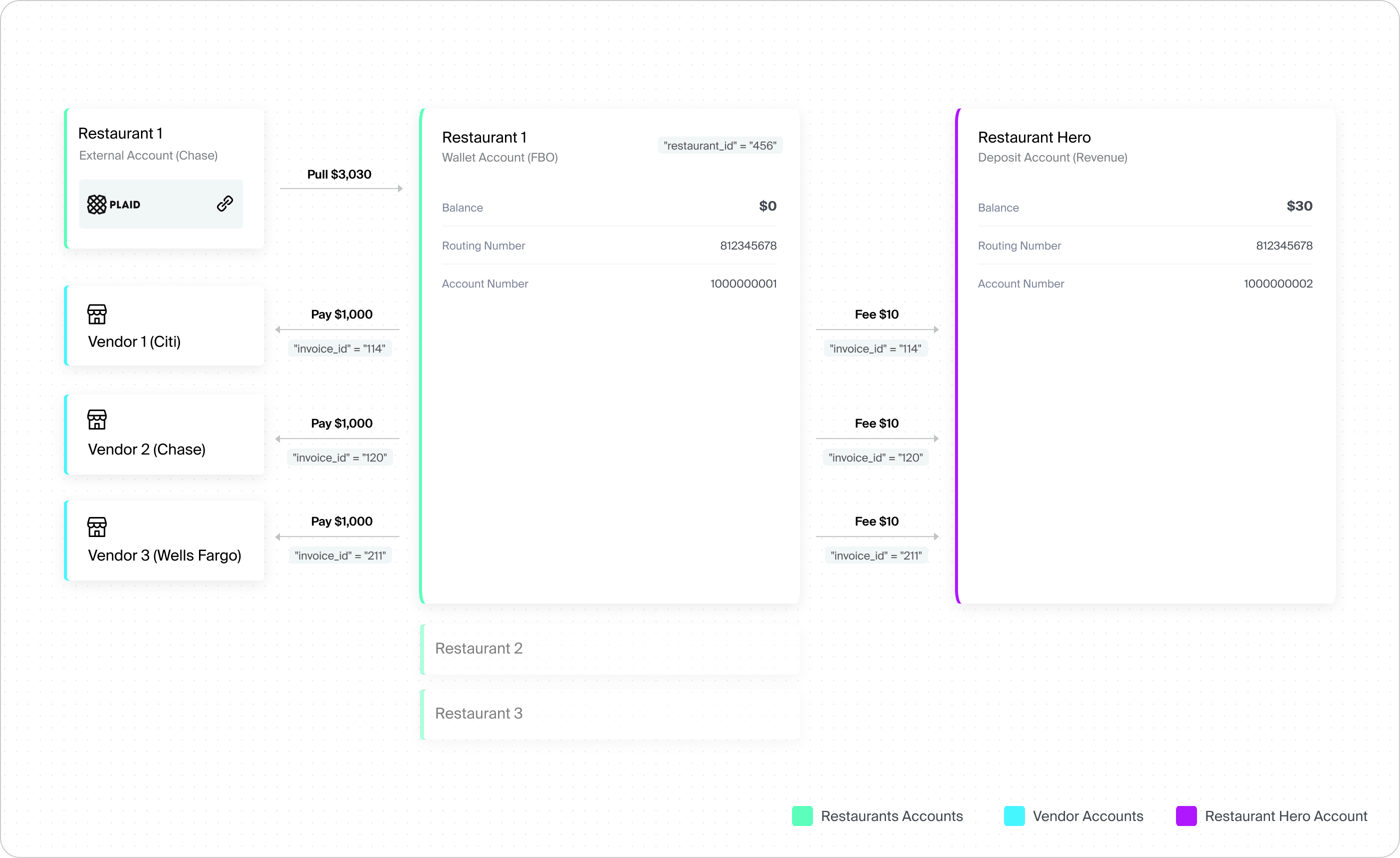
- One wallet (FBO) per restaurant: Customer-specific, bank-held accounts used to facilitate payments without requiring each customer to open a standalone operating account. These wallets typically maintain a $0 balance outside the payment activity, reducing the operational complexity of opening bank accounts for every restaurant.
- Counterparties for vendors: Each vendor (landlord, produce supplier, etc.) is represented as an external account—before payment details are finalized.
- An approval UI: Restaurants use Restaurant Hero’s product to review, approve, and schedule payments.
2. Move the Money
Once bills are approved:
- Pull funds in: Restaurant Hero initiates an ACH debit from the restaurant’s linked external bank account.
- Apply fees: Fees (for example, $10 per bill) are charged once funds land in the wallet.
- Pay vendors out: Payments are sent via ACH, check, RTP, or other rails, based on vendor preferences.
- Use metadata to stay organized: Each payment stays connected to the right restaurants, invoices, and vendors through tags and internal references, making tracking and reconciliation straightforward.
How to Monetize It
Once money flows through your system, multiple revenue streams open up. Transaction fees can be charged per payment based on transaction type or speed, such as $0.50 per ACH or $7.00 per wire. Accounts payable can also be packaged as part of a premium subscription tier or an add-on feature. As payments become more central to daily operations, customers are more willing to pay for simplicity, visibility, and control.
The Bigger Picture
If your product already sits between approval and payment, building money movement isn’t a leap; it’s a natural extension. Done right, embedded accounts payable deepens product stickiness, creates multiple revenue streams and turns operational workflows into financial infrastructure. Money movement isn’t just backend plumbing, it’s a real revenue opportunity.
Building Embedded Accounts Payable with Unit
Unit is designed specifically for companies like Restaurant Hero that want to build and monetize money movement.
At one end of the spectrum, Unit offers managed solutions* that let you go live quickly with minimal operational lift. These solutions provide the core infrastructure (eg: wallets, payment rails, compliance coverage, and reconciliation primitives) so your team can focus on product experience and go-to-market instead of bank integrations and edge cases.
At the other end, Unit’s custom solution gives you full implementation flexibility*. You can:
- Create customer wallets (FBO accounts**) programmatically
- Enable funding and payout flows across multiple rails
- Configure fee logic, timing, and metadata at the transaction level
- Support approvals, retries, and reconciliation at scale
Some platforms want speed to market. Others want deep customization, differentiated pricing, or tight coupling to their existing workflows. Unit supports both, and lets you move along that spectrum over time without re-platforming.
* In this example, Restaurant Hero is a financial technology company and is not a bank. Unit is a financial technology company and is not a bank. Bill Pay services are provided by one or more Bank customers, pursuant to applicable agreements.
** FBO accounts are bank-held accounts established with bank customers.


