
Overview
Overview
The Bill Pay APIs offer one layer of abstraction above the basic financial primitives currently available via API. These endpoints augment our existing payment infrastructure by providing a resilient, auditable payment orchestration layer tailored for bill pay workflows.
| Core Unit API | Bill Pay API |
|---|---|
| Create account | Vendor entity with payment method preferences |
| Originate ACH | Bill entity with status lifecycle |
| — | Submit-to-pay orchestration (scheduled payments) |
| — | Fee computation and routing to revenue account |
| — | Return and failure handling |
| — | Full event audit trail |
Instead of orchestrating payment rails yourself — deduction timing, pass-through settlement, vendor routing, ACH return handling — you call Submit Bill and Unit handles the rest.
Flow of Funds
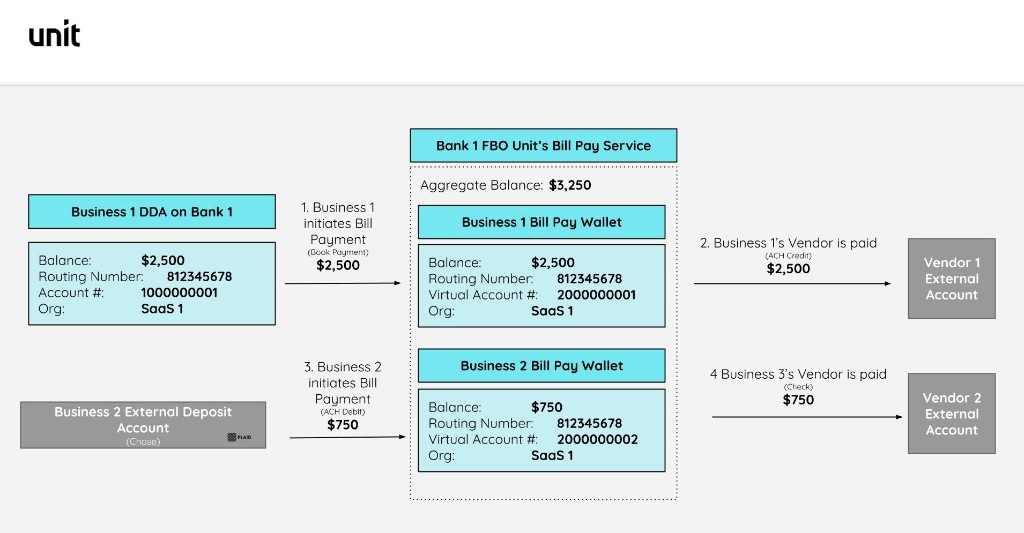
Each merchant gets a dedicated passthrough wallet account. When the deduction date (payment date) for a bill arrives, funds are pulled from the merchant's funding source. If the funding source uses the same partner bank as the wallet, this transaction is a book payment. Otherwise it’s an ACH Debit. Once funds settle into the wallet, Unit initiates the outbound payment through the payment rail (currently ACH, Same Day ACH, or Check by Mail) the user selected.
Core concepts
Key entities:
Bill Pay Customer / Wallet Wallets are used as passthrough accounts. Funds are pulled into it from the merchant's funding source then pushed to the vendor. This happens automatically upon the deduction date for submitted bills.
Vendor Contains: legal name, contact info, one or more payment methods (ACH, check).
Bill The bill is the central entity in the bill pay flow. It contains line items, amounts, vendor, funding source, and schedule. Bills move through a full state machine — every transition is recorded as an immutable event, making each bill a complete audit trail of its own payment lifecycle. In failure cases, a bill can be related to multiple downstream transactions (a failed deduction, a retry, a refund) all tracked under the same bill entity.
Bill status lifecycle
Draft → Scheduled → FundsSettled → FundsPushed → Paid
                ↓                              ↓
        DeductionPaymentFailed         VendorPaymentFailed
                ↓                              ↓
        RefundInitiated              RefundInitiated
A bill can also be Canceled from Scheduled or from FundsPushed (check only). Terminal states are Paid, Canceled, Refunded, and Archived.
End-to-end flow
Step 1 — Provision a Bill Pay customer
For existing Unit banking customers, the application to bill pay is instantly pre-approved.
POST /product-applications
{
  "data": {
    "type": "businessProductApplication",
    "attributes": {
      "requestedProduct": "BillPay",
      "idempotencyKey": "merchant-abc-billpay-001"
    },
    "relationships": {
      "customer": {
        "data": { "type": "businessCustomer", "id": "<customerId>" }
      }
    }
  }
}
Response: A businessProductApplication resource. For net-new customers, status starts as PendingSubmission and goes through a standard application flow.
What happens in the background: On approval, a bill pay wallet is created and its ID is surfaced as payablesAccountId on the resulting billpayCustomerConfig.
Step 2 — Create a vendor
Response: A vendor resource.
Step 3 — Create a bill
Bills can also be created by uploading a PDF or image.
The bill is the key entity in the bill pay flow. It has a full state machine built in, making every payment easily auditable from creation through settlement. In failure scenarios — a failed deduction, a retry, a vendor payment failure — all related transactions are tied back to the same bill, so you always have a single object to reference regardless of how many legs the payment took.
Step 4 — Submit the bill
POST /billpay/bills/{billId}/submit
{
  "data": {
    "type": "bill",
    "attributes": {
      "idempotencyKey": "submit-bill-sysco-inv-4421"
    }
  }
}
Response: The bill resource with updated status — Scheduled for platform payment methods (ACH, check, wire), or Paid immediately for external payments.
On submit, Unit:
- Validates the deduction date (must be a future banking day)
- Computes the expected vendor payment date based on payment method and org terms
- Computes any applicable fees
- Schedules the deduction from the funding account into the passthrough wallet
- Queues the outbound payment to the vendor
On the deduction date, Unit pulls the full amount — bill amount plus fee — in a single debit. Once the full amount lands in the passthrough wallet, Unit automatically splits it: the fee is routed to the org's revenue account and the bill amount is pushed to the vendor.
Returns and failures are caught at either leg and surface as distinct bill statuses (DeductionPaymentFailed, VendorPaymentFailed) with structured failure reasons, not generic errors.
Step 5 — Monitor via bill events
Every status transition is recorded as an immutable event — the primary mechanism for reconciliation.
GET /billpay/bills/{billId}/events
Response: An ordered array of typed event resources. Key events to watch:
| Event | Meaning |
|---|---|
billScheduledForPayment | Deduction date confirmed, payment queued |
billDeductionStarted | Pull from funding account initiated |
billFundsSettledInPassthroughAccount | Funds landed in the wallet |
billFundsPushedToVendor | Outbound payment to vendor initiated |
billPaid | Payment confirmed end-to-end |
billDeductionPaymentFailed | Pull from funding source failed |
billVendorPaymentFailed | Outbound payment to vendor failed |
billRefundInitiated / billRefunded | Return handling underway / complete |
Each event has a version and createdAt. The full bill state at any point can be reconstructed from the stream.
Unit also fires webhooks for all major transitions — billSubmitted, billPaid, billVendorPaymentFailed, etc. — See Webhook Events →
What Unit handles so you don't have to
| Concern | What Unit does |
|---|---|
| Deduction scheduling | Validates, schedules, and executes future payments |
| Batched deductions | Bills due on the same day are pulled in a single ACH debit or book payment |
| Fee routing | Fee split from bill amount in the wallet; routed to revenue account automatically |
| Pass-through settlement | Funds verified in the wallet before outbound payment is initiated |
| Payment failures, retries, and refunds | Gracefully handles unsuccessful bill payments |
| Audit trail | Full event log per bill, immutable, ordered |